
बॉट द्वारा निर्देशित पेयरिंग
Telegram में /add_server भेजें. बॉट एक-बार उपयोग वाला पेयरिंग कोड और तैयार इंस्टॉल कमांड देगा; उस कमांड को सर्वर टर्मिनल में पेस्ट करें.
Online Linux server monitoring
Telegram alerts और optional Chrome/Firefox extensions वाला मुफ्त Linux server monitoring service. Local HTTPS agent से servers जोड़ें, SSL expiry देखें, detected services restart करें, logs clean करें, reboot confirm करें और SSH passwords शेयर किए बिना thresholds बदलें.
Telegram में /add_server भेजें. बॉट एक-बार उपयोग वाला पेयरिंग कोड और तैयार इंस्टॉल कमांड देगा; उस कमांड को सर्वर टर्मिनल में पेस्ट करें.
Web dashboard खोले बिना server cards, service buttons, reboot confirmations, log cleanup buttons और threshold menus use करें.
Detected systemd services restart करें, पुराने journal logs साफ करें, logrotate safely चलाएं और service status उसी chat में देखें.
Online Linux server monitoring
Online Server Monitor उन server owners के लिए है जिन्हें भारी dashboard की जगह Telegram, Chrome या Firefox में उपयोगी Linux status चाहिए. यह practical signals और safe actions पर केंद्रित है: alerts, status cards, service checks, log cleanup और confirmed reboot requests.
CPU, RAM, disk, load average या SSL certificate lifetime threshold पार करे तो alert पाएं, और signal सुरक्षित range में लौटे तो resolved message पाएं.
Local agent incidents में पहले देखी जाने वाली metrics भेजता है: uptime, OS info, SSL certificate expiry और detected systemd service states.
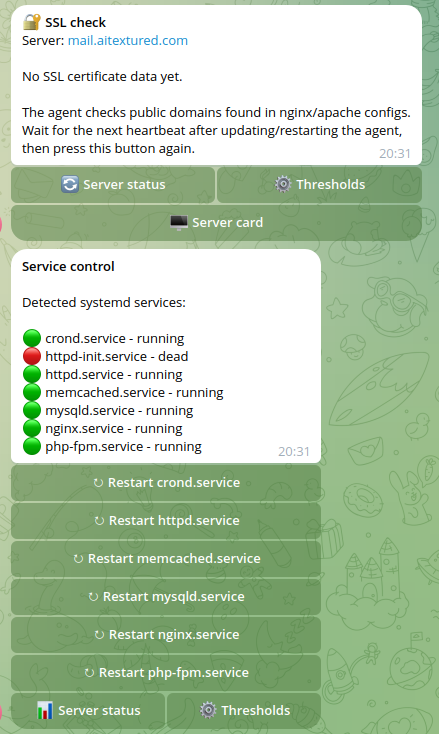
Detected services Telegram buttons के रूप में दिख सकती हैं, इसलिए first-response actions consistent रहती हैं और commands याद करके टाइप करने की जरूरत नहीं होती.
Backend inbound SSH sessions नहीं खोलता. Local agent HTTPS से connect करता है और केवल signed, allowlisted maintenance actions स्वीकार करता है.
एक server के लिए private chat या shared operations के लिए team group इस्तेमाल करें. वही bot status, actions और thresholds उसी जगह दिखाता है जहां team पहले से बात करती है.
यह VPS owners, agencies, freelancers, small hosting teams और site owners के लिए उपयोगी है जिन्हें full observability stack के बिना तेज server visibility चाहिए.
डॉक्यूमेंटेशन
अधिक implementation details और उपयोगी internal links के लिए documentation pages देखें.
Telegram, Chrome और Firefox
उसी lightweight Linux agent से server status, CPU, RAM, disk, load, SSL और systemd alerts Telegram या browser में पाएं.
Alerts, commands, service buttons, thresholds और confirmed maintenance actions के लिए मौजूदा Telegram workflow रखें.
Developer build install करें, उसी PAIRING_TOKEN, से connect करें और Telegram खोले बिना server cards देखें.
Firefox वही backend alerts API poll कर सकता है और browser चलने पर notifications दिखा सकता है.
इंस्टॉल संदर्भ
Telegram में /add_server भेजें. बॉट एक-बार उपयोग वाले पेयरिंग कोड के साथ इंस्टॉल कमांड दिखाएगा. उस कमांड को लक्ष्य सर्वर के टर्मिनल में पेस्ट करें.
curl -fsSL https://server.howprog.one/agent/install.sh -o install.sh
sudo bash install.sh --api https://server.howprog.one --pair PAIRING_TOKEN
मुफ्त Telegram एकीकरण
Online Server Monitor operational workflow को आपके पास रखता है: Telegram alerts, browser server cards, service restarts, log cleanup, reboot confirmation और threshold tuning.
Server metrics configured thresholds पार करें या alert resolve हो तो notification पाएं.
Bot को team chat में जोड़ें, उसी chat से server pair करें और maintenance notifications सबको दिखाएं.
Settings panel खोले बिना Telegram buttons से CPU, RAM, disk, load और SSL expiry limits बदलें.
Detected services restart करें, logs clean करें और उसी alert thread से confirmed reboot request करें.
स्थिति
Dashboard-first uptime tools external website checks पर focus करते हैं. यह service lightweight interface में server owner की जरूरतों पर focus करती है: live Linux metrics, service state और safe actions.
उत्पाद स्क्रीनशॉट
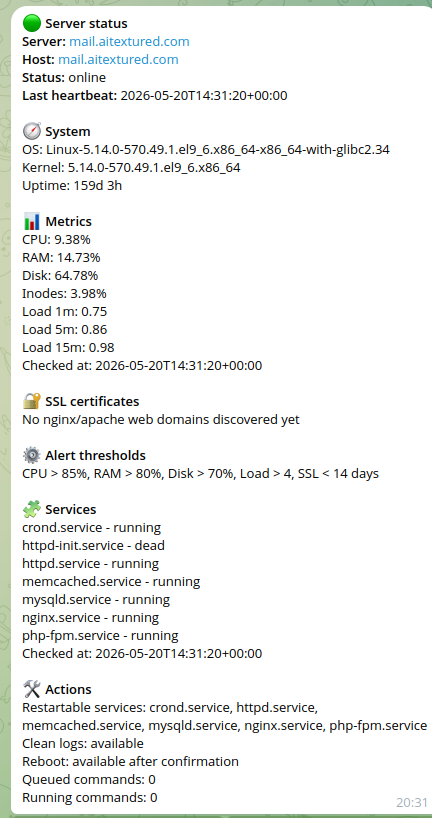
ये स्क्रीनशॉट मुख्य प्रक्रिया दिखाते हैं: बॉट से एक-बार उपयोग वाला पेयरिंग कोड लेना, Linux एजेंट इंस्टॉल करना, पहली सर्वर रिपोर्ट पाना और निगरानी तथा रखरखाव के लिए Telegram बटन इस्तेमाल करना.
निगरानी प्रवाह
Service ऐसा बनाया गया है कि Telegram को SSH password की जरूरत नहीं होती और backend monitored server पर SSH session नहीं खोलता.
बॉट एक-बार उपयोग वाला पेयरिंग कोड बनाता है और लक्ष्य सर्वर के लिए सही इंस्टॉल कमांड देता है.
Agent HTTPS से register होता है, secret को local config file में रखता है और systemd service के रूप में start होता है.
हर report में heartbeat, CPU, RAM, disk, load, uptime, OS info, SSL certificate expiry और detected service states होते हैं.
Service restart, log cleanup और reboot requests signed, short-lived और supported actions तक सीमित होती हैं.
सेटअप गाइड
हर Linux server के लिए ये steps follow करें जिसे आप monitor करना चाहते हैं.
Telegram में @live_server_monitor_bot खोलें और /start भेजें. Bot available commands दिखाएगा.
/add_server भेजें. बॉट एक-बार उपयोग वाला पेयरिंग कोड बनाता है, उसे इंस्टॉल कमांड में जोड़ता है और वह कमांड दिखाता है जिसे सर्वर टर्मिनल में पेस्ट करना है.
Telegram वाली command root या sudo से चलाएं. Agent register होकर secret को /etc/hp-server-agent/config.json में रखता है और systemd service की तरह start होता है.
curl -fsSL https://server.howprog.one/agent/install.sh -o install.sh
sudo bash install.sh --api https://server.howprog.one --pair PAIRING_TOKENInstall के बाद bot success message भेजता है. पहली metrics और service scan आने पर CPU, RAM, disk, load, uptime, SSL status, detected services, available actions और current thresholds दिखते हैं.
Connected servers देखने के लिए /servers use करें. Details, services, thresholds, log cleanup या confirmed reboot के लिए server card खोलें.
/start - पूरी guide खोलें/add_server - सर्वर इंस्टॉल कमांड प्राप्त करें/servers - connected servers दिखाएं/status - full server status दिखाएं/server_status - full server status दिखाएं/thresholds - alert thresholds समझाएं/help - command list दिखाएंसुरक्षा मॉडल
Bot SSH या root passwords नहीं मांगता. Backend server से SSH पर connect नहीं होता. Installed agent HTTPS से backend call करता है और सिर्फ signed, short-lived, allowlisted commands स्वीकार करता है.
समस्या समाधान
इन commands को सिर्फ उसी server पर use करें जहां agent installed है.
systemctl status hp-server-agentjournalctl -u hp-server-agent -n 100 --no-pagerFAQ
एक-बार उपयोग वाला पेयरिंग कोड और इंस्टॉल कमांड पाने के लिए Telegram में /add_server भेजें. कमांड को सर्वर टर्मिनल में पेस्ट करने के बाद स्थानीय एजेंट HTTPS से पंजीकृत होता है और निगरानी डेटा इस सेवा को भेजता है.
नहीं. Online Server Monitor SSH passwords नहीं मांगता. Backend SSH से connect नहीं होता; local agent HTTPS से signed commands लेता है.
Thresholds metric limits हैं, जैसे CPU 90% से ऊपर, RAM 85% से ऊपर, disk 80% से ऊपर, selected load value से ऊपर या SSL expiry 14 दिनों से कम. Limit cross होने पर bot alert भेजता है और बाद में resolved message.
Monitoring शुरू करें
बॉट खोलें, इंस्टॉल कमांड मांगें, उसे सर्वर टर्मिनल में पेस्ट करें और लगभग एक मिनट में पहली सर्वर रिपोर्ट पाएं.